
Our quality products and best service will make your business much better.
Professional . Specialized . Experienced
(English)

23
Dec
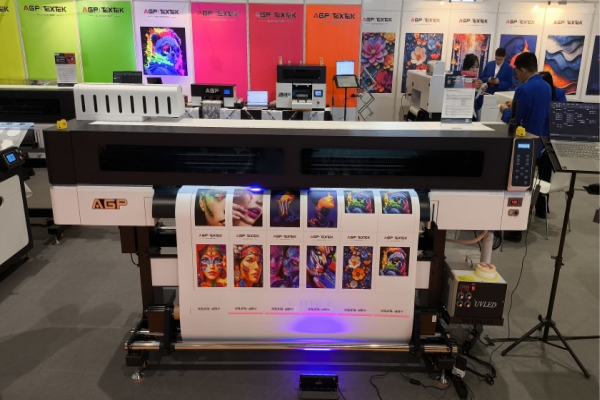
UV LED curing is the technology that makes UV DTF and UV flatbed printing instantaneous — but perfect curing requires matching three variables: UV wavelength to ink photoinitiator, LED intensity to substrate heat sensitivity, and lamp-to-substrate distance to ink layer thickness. Get any one of these wrong and the result is under-cured tacky ink, over-cured brittle prints, or substrate damage. This guide covers how UV LED curing works, why it outperforms mercury lamps, how to tune curing parameters for every substrate type, and how to diagnose and fix the most common UV curing defects.
UV LED curing is a photochemical process where ultraviolet light-emitting diodes emit specific wavelengths of UV light — typically in the 365–405 nm range — that activate photoinitiators embedded in UV ink. When the photoinitiator absorbs UV energy at the correct wavelength, it generates free radicals that initiate a chain polymerization reaction: liquid monomers and oligomers in the ink instantly cross-link into a solid polymer network.
The result is immediate ink solidification — occurring in milliseconds as the substrate passes beneath the UV LED array — rather than the seconds or minutes required for solvent evaporation or thermal drying. This instant curing is what enables UV DTF printers and UV flatbed printers to print, cure, and deliver finished output in a single continuous pass.
Three physical parameters control the quality of every UV LED curing event:
| Feature | UV LED Curing | Mercury Arc Lamp Curing |
|---|---|---|
| Wavelength output | Narrow-band: 365 nm, 385 nm, or 395 nm (selectable) | Broad-spectrum: 250–450 nm continuous |
| Energy consumption | Low — up to 80% less than mercury lamps | High — significant standby power even when idle |
| Heat generation | Minimal — safe for heat-sensitive substrates | High — can damage thin plastics, coated metals, glass |
| Warm-up time | Instant — full output within seconds | 2–5 minutes required before production use |
| Lamp lifespan | 10,000–30,000 hours | 500–2,000 hours |
| Ozone generation | None (no sub-300 nm emission) | Yes — requires ventilation system |
| VOC emissions | Near-zero | Higher — mercury vapor requires extraction |
| Substrate compatibility | Excellent for heat-sensitive materials | Limited — heat-sensitive materials warp or discolor |
| Ink compatibility | Requires ink matched to specific LED wavelength | Broad — works with most UV inks due to wide spectrum |
| Operating cost | Low — long lamp life, low energy, no consumable disposal | High — frequent lamp replacement, energy, mercury disposal |
The one area where mercury lamps retain an advantage is ink compatibility: because mercury lamps emit across a wide UV spectrum, they work with virtually any UV ink formulation without wavelength-matching. UV LED systems require the ink photoinitiator to be matched to the LED's emission peak for complete curing.
The wavelength of the UV LED system must match the absorption peak of the photoinitiator package in your specific UV ink. Using the wrong wavelength — even at high intensity — produces incomplete polymerization because the photoinitiator cannot absorb off-peak UV energy efficiently.
Practical rule: Always verify your UV ink supplier's specified LED wavelength before purchasing a UV LED curing system or changing ink brands. The ink data sheet will list the recommended wavelength range and the minimum curing energy dose (mJ/cm²) required for full cure.
The three variables to control are UV LED intensity (mW/cm²), print speed (which determines exposure time), and lamp-to-substrate distance. These interact: reducing print speed increases exposure time and total UV dose; increasing lamp distance reduces effective intensity at the substrate surface.
Under-Curing: Signs and Causes
Over-Curing: Signs and Causes
| Substrate | Recommended Wavelength | Intensity Range (mW/cm²) | Min. UV Dose (mJ/cm²) | Heat Sensitivity | Primer Required | Key Risk |
|---|---|---|---|---|---|---|
| Acrylic (rigid) | 395 nm | 800–1200 | 300–500 | Medium | No | UV yellowing from over-exposure |
| PVC (rigid) | 395 nm | 800–1400 | 300–500 | Medium | No | Warping on thin sheets (<2 mm) |
| Glass | 365 nm or 395 nm | 1000–2000 | 400–600 | Low | Yes (adhesion primer) | Adhesion failure without primer |
| Aluminum (anodized) | 395 nm | 1000–1800 | 400–600 | Low | Yes (UV primer) | Poor adhesion without primer |
| Stainless steel | 395 nm | 1000–2000 | 400–600 | Low | Recommended | Adhesion on high-polish surfaces |
| Wood / MDF | 395 nm | 800–1400 | 300–500 | Low | Recommended (sealer) | Ink absorption into porous surface |
| Leather (natural) | 395 nm | 600–1000 | 200–400 | High | Recommended | Surface whitening from heat |
| Thin PET / PP film | 395 nm | 400–800 | 200–400 | Very High | No | Warping or melting at high intensity |
| Ceramic / tile | 365 nm or 395 nm | 1000–2000 | 400–800 | Low | Yes (adhesion primer) | Adhesion failure without primer |
| UV DTF AB film | 395 nm (+ 365 nm for white) | 1000–1600 | 400–600 | Medium | No | Under-cure of white ink layer |
All values are reference ranges. Actual parameters depend on UV ink formulation, LED array configuration, lamp age, and ambient temperature. Always validate with scratch test (fingernail) and tape adhesion test before production.
Why is my UV print tacky even after curing?
Tackiness after curing almost always indicates under-curing — insufficient UV dose reaching the full depth of the ink layer. Check four things in this order: (1) confirm your UV LED wavelength matches the photoinitiator specification in your ink data sheet; (2) measure actual LED intensity at the substrate surface with a UV radiometer — it may have degraded from lamp aging; (3) reduce print speed to increase exposure time; (4) verify lamp-to-substrate distance has not increased due to substrate thickness variation or lamp mounting shift. If tackiness persists after addressing all four, contact your ink supplier to confirm the ink has not exceeded its shelf life, as aged photoinitiators lose reactivity.
My UV prints crack when the substrate is flexed. What is wrong?
Cracking on flex indicates over-curing (excessive UV cross-linking creating a brittle polymer network) or a mismatch between the ink formulation and the substrate's flex requirement. First, reduce UV intensity or increase print speed and retest. If the cracking persists, the UV ink formulation may not be suitable for the substrate — rigid-substrate UV inks are not designed to flex. Use a flexible UV ink formulation (often marketed as "UV flex ink") for materials that bend, such as leather, thin films, or flexible PVC.
Can I use UV LED curing on heat-sensitive substrates like thin plastic film?
Yes, but with care. UV LED systems produce significantly less heat than mercury arc lamps, making them suitable for heat-sensitive substrates that mercury lamps would warp or discolor. The key is to keep intensity as low as possible while still achieving complete cure — use the minimum effective intensity (verify with scratch and tape tests), maximize lamp-to-substrate distance within the printer's design range, and ensure the substrate cooling system (if present) is operating. Always test on a sample piece before committing to a production run on any heat-sensitive material.
What is the difference between UV curing intensity (mW/cm²) and UV curing dose (mJ/cm²)?
Intensity (mW/cm²) is the instantaneous power of UV light hitting the substrate surface — how strong the UV is at any given moment. Dose (mJ/cm²) is the total UV energy delivered over the full exposure time — intensity multiplied by exposure duration in seconds. A print can receive adequate dose either through high intensity over a short exposure, or lower intensity over a longer exposure. Both parameters matter: very high intensity can damage heat-sensitive substrates even if exposure time is short, while very low intensity may fail to cure thick ink layers even with extended exposure time.
Why does my white UV ink layer cure more slowly than CMYK colors?
White UV ink contains titanium dioxide (TiO₂) as its white pigment. TiO₂ is highly UV-reflective and scattering — it reflects and scatters UV light before it can penetrate to the full depth of the ink layer. This means the photoinitiator at the bottom of a white ink layer receives far less UV energy than the surface, resulting in incomplete through-cure even when the surface appears fully set. Solutions: use a 365 nm LED (shorter wavelength penetrates more effectively into TiO₂-containing layers), slow print speed to increase total UV dose, or print white ink in two thinner passes rather than one thick pass.
How do I know if my UV LED lamp needs replacing?
The clearest signs of lamp replacement need are: (1) measurable intensity drop below 80% of baseline output (measured with a UV radiometer); (2) prints that pass quality checks at lower print speeds but fail at normal production speed — indicating reduced effective dose; (3) adhesion failure appearing on substrates that previously cured reliably without parameter changes. Do not wait for complete lamp failure — schedule replacement based on operating hour tracking against the lamp's rated lifespan, and budget for replacement lamps as a regular consumable in production UV printing operations.
Does UV LED curing work for both UV DTF printing and UV flatbed printing?
Yes. UV LED curing is the standard curing technology in both UV DTF printers (where ink is cured on AB film in roll-to-roll format) and UV flatbed printers (where ink is cured directly on rigid substrates placed on the print platen). The curing physics are identical; the difference is that UV DTF requires curing through the CMYK + White + Varnish ink stack on a flexible film carrier, while UV flatbed curing must achieve adhesion to the rigid substrate surface directly. Parameter settings differ between these two modes and should be configured separately in your printer's RIP software.
Perfect UV LED curing on any material requires aligning four variables simultaneously: the correct wavelength for your ink's photoinitiator, sufficient intensity for the substrate's heat tolerance, adequate total UV dose for full through-cure of the ink layer, and consistent lamp performance maintained through regular measurement and cleaning.
The most common mistake in UV printing operations is treating curing as a fixed setting rather than a variable that needs to be profiled for each new substrate and ink combination. Build the habit of running a scratch test and tape adhesion test on every new job setup — these two tests take under a minute and catch curing problems before they reach customer orders.
Textek UV DTF printers integrate precision UV LED curing systems calibrated for the full CMYK + White + Varnish ink stack on AB film. For UV LED specifications, substrate curing parameter guides, and technical support, visit textek.cn or contact our technical team directly.


