
Our quality products and best service will make your business much better.
Professional . Specialized . Experienced
(English)

09
Nov
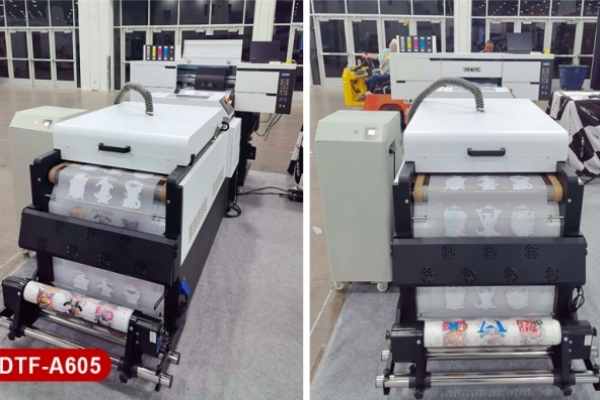
A pass is one sweep of the printhead, and "6-pass" means the printer needs six sweeps to finish each strip of an image. 6-pass is the fast, everyday setting for garment transfers. 8-pass smooths gradients and fine detail but runs roughly 20–35% slower. 12-pass and above trade more speed for smoothness and show up mostly on UV DTF and fine-detail jobs. Higher is not automatically better: past a point you pay in speed for gains most customers cannot see. Below you'll find what each setting does, Textek's published speeds, and how to pick one.
Key Takeaway: A pass is one sweep of the printhead across the film. A 6-pass mode completes each spot of the design over six sweeps, with each sweep placing only part of the ink dots.
When you pick a DTF printer, the spec sheet almost always lists a pass count next to the printing speed: 6Pass, 8Pass, 12Pass, sometimes 16Pass. It looks like a technical detail, but it tells you a lot about how the machine trades speed against smoothness.
Here is what actually happens. In a multi-pass mode, the printer does not lay down every dot for a strip of the image in one go. Each sweep fires a fraction of the dots, and the sweeps are interleaved so the dots from different passes fill in between each other. After six sweeps (in 6-pass mode) that strip is complete. For example, the Textek T30 DTF printer offers 6Pass and 8Pass. In 8Pass mode every spot of the pattern is completed over eight sweeps instead of six.
Two things are worth knowing:
Key Takeaway: Each step up gives smoother output with better printing accuracy and color vibrancy, and each step down gives you more square meters per hour. The right setting depends on the job, not on the biggest number.
Key Takeaway: No. A higher pass count only improves what you can actually see, which is mainly gradients, fine text and banding. On solid-color logos at normal viewing distance, 6-pass and 8-pass are often hard to tell apart.
It is easy to assume more passes always equals a better print. In practice, there are diminishing returns, and several other things matter as much as the pass setting:
The practical test is simple: print the same file at two settings, compare them at the distance a customer will actually look at the shirt, and use the faster setting if you cannot tell the difference.
Key Takeaway: DPI describes how fine the dots are. Pass count describes how many sweeps it takes to place them. Manufacturers usually pair the two in presets, so higher-pass modes typically come with higher resolution.
The two terms are often mixed up, but they are different settings that move together. The Textek UV-6090T shows how a manufacturer pairs them: 6-pass at 720×1800 dpi, 8-pass at 720×2400 dpi and 12-pass at 720×3600 dpi. More dots to place means more sweeps and lower speed.
That is why you should not judge a printer by the pass number alone. Check the resolution that comes with each mode, the number of printheads and the printhead model. A machine with more printheads can cover more width per sweep, which is a different thing from running more passes.
Key Takeaway: Start at 6-pass for everyday garment work, move to 8-pass for photos and dark garments with large white areas, and use 12-pass on UV DTF printers when fine detail matters more than throughput.
These are starting points. Your film, ink and RIP profile will move the result, so run a test print on your own materials before you commit to a production setting.
What does 6-pass mean on a DTF printer?
It means the printhead sweeps six times to complete each strip of the image. It does not mean six layers of ink are stacked. The amount of ink is set by ink density and resolution in your RIP software.
Is 8-pass better than 6-pass for DTF printing?
It is smoother but slower. On the Textek DTF-T30, 8-pass runs at 8 m²/h versus 12 m²/h at 6-pass. It is worth using for gradients, photos, small text and large white areas on dark garments. For solid logos and bold text, most people cannot see a difference.
Do I need 12-pass for garment DTF printing?
Usually not. In Textek's range the 12-pass modes are on the UV DTF models. For garment transfers, 6-pass and 8-pass cover almost all work.
Does a higher pass count use more ink?
Not directly. The pass count splits the same dots across more sweeps. Ink use is driven by ink density, resolution and white ink settings in the RIP. Because higher pass modes often come with higher-resolution presets, check your ink consumption when you switch modes.
Will a higher pass count fix banding?
Sometimes it makes banding less visible, because more nozzles share the work on each line. It will not fix a clogged nozzle or a media feed problem. Run a nozzle check and clean the printhead first, then change the pass mode if banding remains.
Is pass count the same as DPI?
No. DPI is how finely the dots are placed and pass count is how many sweeps it takes to place them. They are usually paired in a printer's presets, which is why they get confused.
Is there a 4-pass mode?
Some printers offer 4-pass as a fast draft mode. The Textek DTF and UV DTF spec sheets for the models above list 6-pass and higher.
What pass setting is best for UV DTF crystal labels?
8-pass is a sensible production setting for most labels. Use 12-pass for fine text or photographic artwork where speed matters less. Test on your own AB film and UV ink first.
For full specifications on the models mentioned here, see the Textek DTF-T30 and the Textek UV DTF printer range, or contact info@textek.cn to request sample prints at different pass settings.


