
Our quality products and best service will make your business much better.
Professional . Specialized . Experienced
(English)

17
Jul
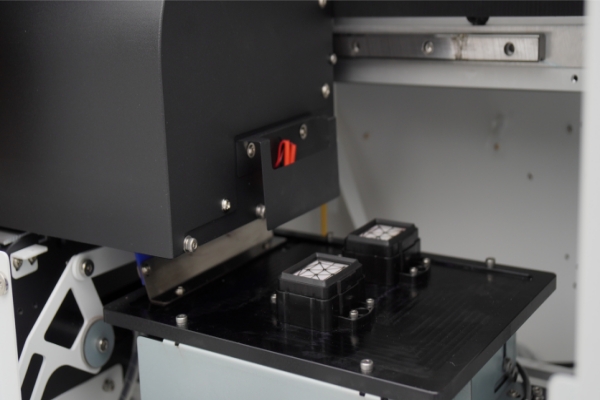
Ink return — also called ink backflow — is one of the most disruptive failures in daily DTF printer operation. When ink flows backward through the damper into the ink supply tube instead of forward to the printhead, print quality degrades immediately and, if left unresolved, can damage the printhead permanently. The root cause is almost always an air pressure imbalance in the ink supply system, caused by a leaking ink cartridge, a failed damper, or a loose tube connection. This guide covers every cause, every fix, and a preventive maintenance protocol to stop ink return before it starts.
In a properly functioning DTF printer ink supply system, a slight and consistent negative pressure (vacuum) is maintained between the ink cartridge, the ink supply tube, and the damper. This controlled negative pressure draws ink forward toward the printhead on demand. When this pressure balance is disrupted — by air entering the system, by a component failure, or by a blockage downstream — the pressure gradient reverses and ink flows backward.
The damper (also called the ink buffer or ink filter unit) is the component that sits directly upstream of the printhead and regulates ink flow. It is the first place where ink return becomes visible: when backflow occurs, the damper fills with ink that has reversed course, and the system can no longer supply clean, pressure-controlled ink to the printhead nozzles.
Ink return failure is particularly common in large-format DTF printers and 60cm DTF printers because these machines have longer ink supply tube runs between the cartridge bay and the printhead carriage. The greater the tube length, the more opportunity there is for air infiltration and pressure fluctuation.
The consequences of unresolved ink return include: visible banding and color gaps in prints, ink color contamination between channels, ink overflow onto the print platen or capping station, and — in severe cases — ink drawn back into the printhead body itself, causing permanent nozzle damage that requires printhead replacement.
Cause 1: Ink Cartridge Air Leakage
Under normal operating conditions, a small amount of air may exist within the ink supply tube — this is acceptable and does not disrupt pressure balance. However, if the ink cartridge seal is compromised, or if the cartridge was refilled improperly and air was introduced during filling, large volumes of air enter the ink supply system. This air pocket travels through the tube and breaks the negative pressure gradient, causing ink in the damper to reverse direction and flow back toward the cartridge.
Signs of cartridge-related ink return include: the ink level in the damper dropping suddenly, air bubbles visible inside the transparent ink supply tube, and intermittent rather than continuous ink backflow events (typically correlated with cartridge movement during printhead carriage travel).
Cause 2: Damper Leakage or Damper Failure
The damper membrane is a thin flexible diaphragm that regulates ink flow and absorbs pressure fluctuations during printhead operation. Over time — or due to exposure to certain ink chemistries or improper cleaning solutions — this membrane can develop micro-tears, become stiff, or fail at the seal point where the damper connects to the ink tube and the printhead inlet.
A leaking damper allows air to enter the ink supply system continuously, making it impossible to maintain the negative pressure required for forward ink flow. Damper failure is particularly common after aggressive printhead cleaning cycles that pull ink through the system at higher than normal vacuum pressure. Signs include ink pooling around the damper body, visible deformation of the damper membrane when the system is pressurized, and ink return that persists even after recapping and running a standard nozzle-clean cycle.
Cause 3: Loose or Unsealed Ink Supply Tube Connections
The ink supply tube in a DTF printer connects multiple components: the cartridge bay outlet, intermediate connectors, the damper inlet, and — on bulk ink systems — the sub-tank and main tank fittings. Any connection point that is not fully seated and airtight acts as an entry point for ambient air. Even a micro-gap at a push-fit connector is sufficient to introduce enough air to destabilize the pressure balance over a print run.
This failure mode is more common after maintenance procedures (cartridge replacement, tube replacement, or printhead cleaning) where connections are disturbed and not fully re-seated. It is also common on DTF printers operated in low-humidity environments, where ink in the tube near unsealed connection points can partially dry and create a gap.
Follow this diagnostic sequence before attempting any repair:
Fix 1: Resolving Ink Cartridge Air Leakage
Fix 2: Replacing a Leaking or Failed Damper
Fix 3: Re-sealing Ink Supply Tube Connections
Fix 4: Installing a One-Way Valve on the Ink Supply Pipeline
For DTF printers — particularly large-format and 60cm DTF printers — that experience recurrent ink return events despite proper component maintenance, installing a one-way valve (check valve) on the ink supply pipeline provides an additional layer of protection. A one-way valve allows ink to flow only in the forward direction (toward the printhead) and physically prevents reverse flow regardless of pressure fluctuations. Install the valve inline on the ink supply tube between the cartridge bay and the damper. Close the valve during idle periods when the DTF printer is not in use — this eliminates the passive pressure drift that can trigger ink return during overnight or weekend shutdowns.
| Symptom Observed | Most Likely Cause | Component to Inspect | Fix | Recurrence Risk Without Fix |
|---|---|---|---|---|
| Air bubbles visible in ink supply tube | Cartridge seal leak or air in cartridge | Ink cartridge needle seal, vent hole | Replace cartridge; run 2–3 ink charge cycles | High — printhead nozzle damage within days |
| Damper visibly full / overfilled with ink | Damper membrane failure | Damper membrane, damper seal joints | Replace damper with pigment-ink-rated unit | High — ink overflow onto carriage |
| Ink leaking around tube connector joints | Loose or unsealed tube connection | All push-fit connectors along ink tube path | Re-seat connectors; apply silicone sealant externally if needed | Medium — worsens with each print run |
| Ink return only during printhead carriage movement | Tube kinked or too short — pulls connections during travel | Ink tube routing and length | Re-route tube with adequate slack; replace if kinked | Medium — progressive tube wear |
| Ink return only after long idle periods | Passive pressure drift — no one-way valve | Full ink supply system | Install one-way valve; close valve when printer is idle | Medium — recurring overnight events |
| Ink return in one channel only | Single damper failed or single cartridge compromised | Affected channel damper and cartridge | Replace affected channel damper and cartridge | High — color contamination spreads |
| Ink return immediately after printhead cleaning | Excessive vacuum during cleaning pulled membrane | Damper membrane condition | Replace damper; reduce cleaning cycle intensity in maintenance settings | High if cleaning cycle not adjusted |
| Ink return with no visible leaks or air bubbles | Sub-tank or main tank seal failure (bulk ink systems) | Sub-tank cap seals, main tank outlet fittings | Inspect and replace sub-tank seals; re-seat main tank outlet fittings | Medium — intermittent until seal fully fails |
Daily Maintenance (before first print of the day)
Weekly Maintenance
How do I know if my DTF printer has an ink return problem?
The clearest sign is an over-full damper on startup — if the damper appears visually fuller with ink than when the printer was last shut down, ink has flowed backward overnight. Other signs include air bubbles visible in the transparent ink supply tube, ink leakage around the damper body or tube connections, and print output showing banding or missing nozzle rows even after a normal cleaning cycle. Run a nozzle check print immediately — ink return typically manifests as systematic gaps rather than random single-nozzle failures.
Can I continue printing if I notice ink return?
No. Printing through an active ink return condition causes immediate print quality degradation (banding, color gaps, color contamination between channels) and risks drawing reversed ink directly into the printhead body. This can permanently block printhead nozzles with dried, mixed ink. Stop printing, diagnose the root cause using the steps in Section 3, and perform the appropriate fix before resuming production.
How often should I replace the damper on my DTF printer?
In a production DTF printing environment (6–8 hours of printing per day), dampers should be inspected monthly and replaced every 3–6 months as preventive maintenance. In lower-volume environments, replace when membrane deformation, leakage, or ink return events occur. Always use a damper rated for water-based pigment ink — not solvent ink dampers, which are built from incompatible elastomer materials that fail rapidly when exposed to DTF pigment ink chemistry.
What is a one-way valve and where should it be installed on a DTF printer?
A one-way valve (also called a check valve) is a small inline fitting that allows fluid to flow in only one direction. For DTF printer ink supply systems, the valve is installed on the ink supply tube between the cartridge bay and the damper. It physically prevents ink from flowing backward regardless of pressure conditions. The valve should be closed when the printer is idle (overnight, weekends) and opened before each printing session. One-way valves are particularly recommended for large-format and 60cm DTF printers with long tube runs, where passive pressure drift during idle periods is most pronounced.
My ink return is only happening in the white ink channel. Why?
White DTF ink is the most common channel for single-channel ink return events because titanium dioxide pigment in white ink is denser than any other pigment in the system. Settled TiO₂ creates a partial flow restriction in the white ink supply tube that can cause localized pressure imbalance. The fix: agitate the white ink cartridge or tank daily, increase white ink circulation frequency if your printer supports ink circulation, and inspect the white channel damper for membrane stiffness caused by TiO₂ crystallization — a condition that requires damper replacement rather than cleaning.
I replaced the damper but ink return is still happening. What did I miss?
If ink return persists after damper replacement, the residual cause is almost always either (1) an ink cartridge seal that was not identified as the root cause during the initial inspection, or (2) a tube connection that was disturbed during the damper replacement procedure and not fully re-seated. Re-trace the diagnostic sequence in Section 3 with the new damper installed. Also confirm that the replacement damper was correctly oriented — some damper models have directional flow arrows, and installing them backwards replicates ink return symptoms.
Can I fix a leaking damper with adhesive or sealant rather than replacing it?
Not reliably. The damper membrane operates under cyclical vacuum pressure during every printhead firing sequence. Any adhesive repair of a failed membrane will fail under this cyclical stress within hours to days, often releasing adhesive residue into the ink stream that then causes printhead nozzle blockages. Replace the damper — it is a low-cost consumable relative to the cost of a printhead or lost production time.
Does ink type or ink quality affect the frequency of ink return problems?
Yes, significantly. Low-quality DTF pigment inks with poor pigment suspension, coarse particle distribution, or incompatible carrier chemistries accelerate damper membrane degradation and are more likely to produce crystalline sediment in tube connections. High-quality DTF inks formulated for Epson micro-piezo printhead systems — with controlled particle size, compatible carrier solvents, and stable pigment suspension — reduce the frequency of both ink return events and printhead cleaning requirements across the full ink system.
Ink return in a DTF printer is not a random malfunction — it is a pressure imbalance that always has a specific mechanical cause. Check the ink cartridge seal, inspect the damper membrane, and verify every tube connection in sequence. Replace the failed component immediately rather than running a cleaning cycle and hoping the problem resolves itself.
For recurring ink return problems, install a one-way valve on the ink supply pipeline and establish a weekly maintenance schedule that includes damper inspection, connection verification, and white ink agitation. These habits eliminate the majority of ink backflow events before they affect print output or damage the printhead.
Textek DTF printers are engineered with ink supply systems designed to minimize pressure instability, using high-quality dampers, precision tube fittings, and optional ink circulation for the white channel on production-grade models. For spare parts, damper replacements, and technical support for your DTF printer ink system, visit textek.cn or contact our service team directly.


